Physical Address
304 North Cardinal St.
Dorchester Center, MA 02124
Physical Address
304 North Cardinal St.
Dorchester Center, MA 02124

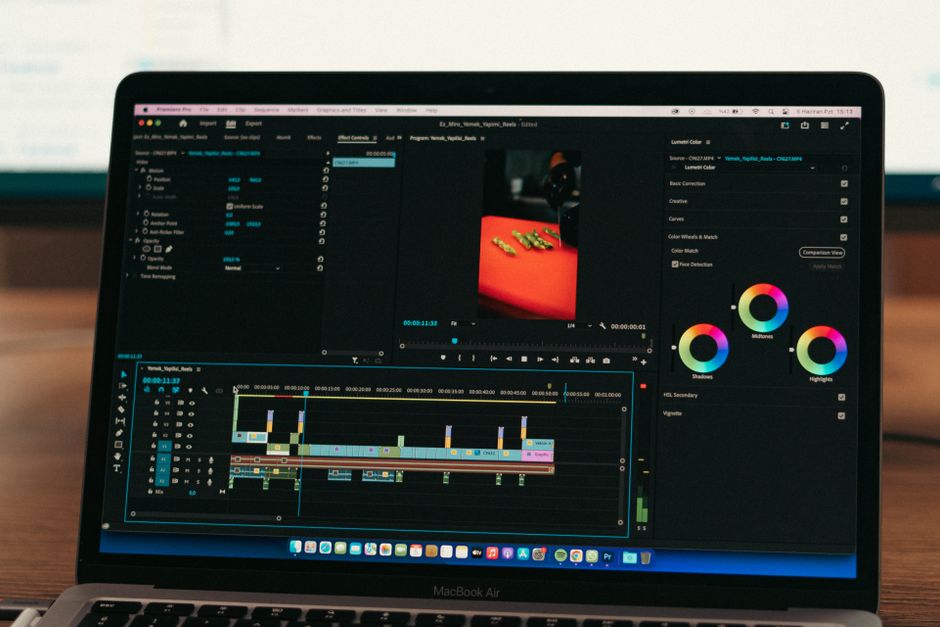
Compare the best laptops for video editing in 2026. Discover whether Windows or Mac dominates performance, battery, and value for creators.
Choosing the right video editing laptop in 2026 is more challenging than ever. With 8K timelines, complex AI-driven masking tools, and high-framerate HDR footage becoming standard, creators need serious mobile horsepower. The eternal debate between Windows and macOS reaches a pivotal turning point this year, as silicon architectures mature and hardware prices shift.
Whether you are a traveling wedding videographer rendering proxies on the go or a studio filmmaker scrubbing massive RAW files, your machine dictates your workflow efficiency. This guide breaks down the absolute best video editing laptops available as of September 2026, comparing leading Windows powerhouses against Apple’s latest MacBook Pro offerings.
Here is a quick snapshot comparing the top contenders in the 2026 video editing market, highlighting their core strengths and drawbacks.
| Laptop Model | Platform | Price (USD) | Pros | Cons |
|---|---|---|---|---|
| Apple MacBook Pro 16 (M4 Max) | macOS | $3,499 | Phenomenal battery life, industry-leading export speeds in Final Cut, gorgeous Liquid Retina XDR display. | Expensive upgrades, non-upgradable RAM and storage, limited gaming library. |
| MSI Titan 18 HX (2026 Edition) | Windows | $4,199 | Unmatched raw desktop-class performance, expandable up to 128GB RAM, massive screen real estate. | Bulky chassis, heavy power brick, loud fan noise under full rendering load. |
| ASUS ROG Zephyrus G16 (2026) | Windows | $2,699 | Stunning OLED display, sleek portable design, incredible balance of gaming and content creation power. | Soldered RAM, can run warm during extended multi-hour export sessions. |
To make an informed purchasing decision, we must analyze the specific specifications, real-world rendering capabilities, and pricing structures of the top editing machines on the market today. Each ecosystem offers distinct advantages for modern post-production pipelines.
Leading the Apple ecosystem is the Apple MacBook Pro 16 equipped with the M4 Max chip, retailing starting at $3,499. Featuring up to a 16-core CPU, 40-core GPU, and unified memory configurations scaling up to 128GB, the M4 Max handles multi-stream 8K ProRes video with effortless grace. Apple’s dedicated media engines accelerate H.264, HEVC, and ProRes encoding hardware-side, slashing render times in Final Cut Pro and Adobe Premiere Pro.
Beyond raw computing muscle, the 16.3-inch Liquid Retina XDR display boasts a sustained 1,000 nits of brightness and a 1,000,000:1 contrast ratio, making it an exceptional mobile grading suite for HDR colorists. Furthermore, battery life remains unmatched; unlike its Windows competitors, the MacBook Pro 16 delivers identical export performance whether plugged into a wall outlet or running on battery power in a remote location.
On the Windows side, the MSI Titan 18 HX reigns supreme for creators who refuse to compromise on raw power. Priced at $4,199, this desktop replacement features the latest Intel Core i9 processor paired with an NVIDIA GeForce RTX 5090 laptop GPU. With support for up to 128GB of DDR5 RAM and multiple PCIe Gen 5 M.2 SSD slots, the Titan is built for heavy VFX artists working in Blender, Cinema 4D, and heavy After Effects compositions.
The MSI Titan’s trade-off is portability. Weighing over eight pounds with a massive power supply, it is designed to sit on a desk rather than travel in a backpack. However, for studio editors juggling massive cache files and multi-layer effects, the thermal headroom and connectivity options—including Thunderbolt 5 ports and full-sized SD card readers—justify the physical footprint.
For creators seeking a middle ground, the ASUS ROG Zephyrus G16 (2026) at $2,699 offers a brilliant synthesis of mobility and performance. Sporting a gorgeous 16-inch OLED panel with a 240Hz refresh rate and 100% DCI-P3 color gamut coverage, it rivals Apple’s display quality. Powered by AMD Ryzen AI processors and NVIDIA RTX graphics, it handles Premiere Pro, DaVinci Resolve, and color grading workflows fluidly while maintaining a slim, aluminum chassis that easily slides into a messenger bag.
Navigating the video editing laptop market requires evaluating your specific software stack, footage codecs, and working environment. Keeping a few core metrics in mind will ensure you invest your money wisely.
First, analyze your primary editing software. If your studio relies heavily on Apple’s Final Cut Pro, macOS is your mandatory destination. Conversely, if you live inside the Adobe Creative Cloud ecosystem (Premiere Pro, After Effects, Audition) or utilize specialized 3D rendering pipelines like Unreal Engine and Houdini, Windows offers broader native plugin compatibility and raw CUDA acceleration.
RAM and storage configurations are non-negotiable. In 2026, 32GB of RAM is the practical baseline for 4K video editing, while 64GB or 128GB is recommended for complex 8K timelines and heavy VFX work. Look for fast NVMe SSD storage with read/write speeds exceeding 5,000 MB/s to ensure smooth media scrubbing without dropped frames.
Finally, consider display accuracy and port selection. Factory color calibration, wide color gamuts (DCI-P3 or AdobeRGB), and high peak brightness are vital for accurate color grading. Ensure the laptop includes physical ports like HDMI 2.1, SD Express card slots, and USB-C/Thunderbolt connections so you can plug in external RAID drives and reference monitors without messy dongles.
How much RAM do I need for video editing in 2026? For standard 1080p and light 4K editing, 16GB is acceptable, but 32GB is the modern sweet spot. If you regularly edit 4K/8K RAW footage, apply heavy color grading nodes, or work with After Effects composites, you should opt for 64GB or higher.
Is Windows or Mac better for DaVinci Resolve? Both platforms run DaVinci Resolve exceptionally well. Mac benefits from unified memory architecture which speeds up memory bandwidth for AI tools, while high-end Windows laptops leverage powerful NVIDIA RTX GPUs for faster neural engine processing and tensor core utilization.
Can I upgrade the internal components of a video editing laptop? Most modern creator laptops feature soldered RAM and processors. While Windows machines like the MSI Titan allow for storage and sometimes RAM upgrades, Apple MacBooks feature fully unified memory where nothing can be upgraded post-purchase, making it critical to configure your specs correctly at checkout.
The choice between Windows and Mac for video editing in 2026 ultimately depends on your workflow priorities and studio environment. There is no single universal winner, but rather the right tool for your specific creative demands.
If you value all-day battery life, exceptional display calibration out of the box, and a streamlined, quiet workflow that excels in Final Cut Pro and Premiere, the Apple MacBook Pro 16 with the M4 Max chip is the ultimate overall recommendation for mobile creators.
However, if your post-production pipeline demands maximum rendering throughput, expandable storage, heavy 3D rendering integration, and uncompromised NVIDIA CUDA performance, a high-end Windows machine like the MSI Titan 18 HX or the portable ASUS ROG Zephyrus G16 will serve as your powerhouse studio foundation.
Prices and features mentioned are accurate as of the date of publication. Always check the official provider website for the most current pricing and availability.




