Physical Address
304 North Cardinal St.
Dorchester Center, MA 02124
Physical Address
304 North Cardinal St.
Dorchester Center, MA 02124

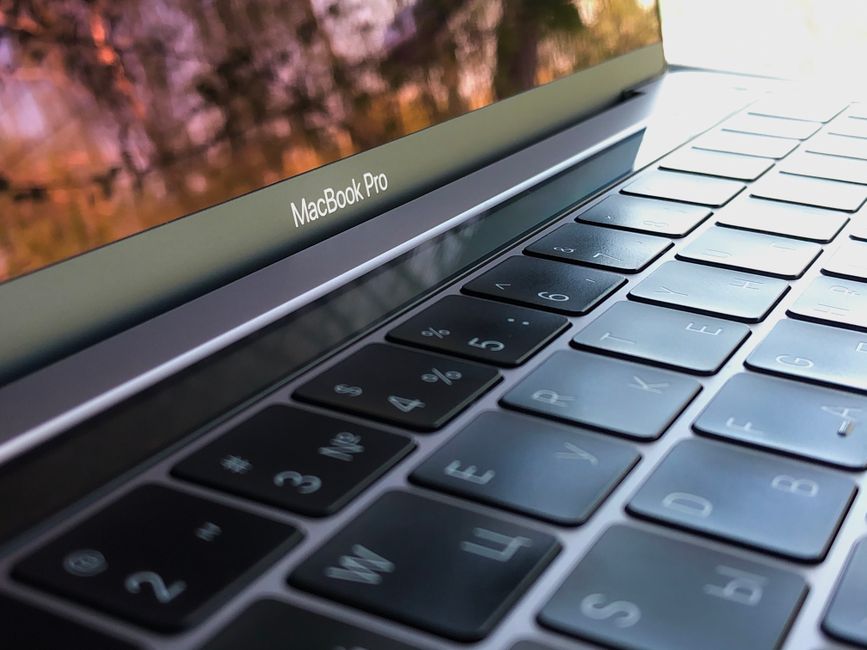
Dell XPS 13 vs Apple MacBook Neo: Who wins the crown for the best budget laptop of 2026? Read our in-depth comparison of specs, price, and performance.
The year 2026 has brought a massive paradigm shift to the budget laptop market. For years, choosing an affordable notebook meant accepting cheap plastic chassis, dim displays, sluggish processors, and terrible battery life. But this year, Apple and Dell have shattered those expectations, completely redefining what users can expect for under $700. In early 2026, Apple made a highly anticipated move by introducing the MacBook Neo—its cheapest laptop ever—initially starting at $599 before a recent $100 price hike raised it to $699 due to the global AI memory crunch. Dell immediately responded with its own budget-friendly champion, the newly redesigned Dell XPS 13 (2026), matching the Neo’s $699 starting price point and targeting students, casual users, and mobile professionals.
This comparison matters because these are not just repackaged, older laptops. Both the Dell XPS 13 and the Apple MacBook Neo are brand-new, modern machines featuring cutting-edge hardware designed for efficiency and style. While Apple is utilizing a fanless, silent design paired with an iPhone-derived A18 Pro chip, Dell is leaning on Intel’s new ‘Wildcat Lake’ Core 5 processor to deliver high-performance computing in an incredibly lightweight package. If you have $700 to spend on a laptop in 2026, you no longer have to compromise on build quality, but you do have to make some crucial trade-offs. This in-depth comparison will help you decide which of these budget powerhouses is the right choice for your needs.
Below is an at-a-glance comparison of the base models of the Dell XPS 13 and the Apple MacBook Neo in 2026:
| Feature | Dell XPS 13 (2026) | Apple MacBook Neo (2026) |
|---|---|---|
| Starting Price | $699 ($599 for students) | $699 ($499 for students) |
| Processor | Intel Core 5 320 ‘Wildcat Lake’ (6 cores) | Apple A18 Pro (6-core CPU, 5-core GPU) |
| Base Memory | 8GB LPDDR5X (Soldered) | 8GB Unified Memory (Soldered) |
| Base Storage | 512GB PCIe NVMe SSD | 256GB SSD |
| Display | 13.4-inch 2.5K (2560 x 1600) Touch/Non-Touch, 30-120Hz | 13-inch Liquid Retina (2408 x 1506) IPS, 60Hz |
| Weight | 2.2 lbs (1.0 kg) | 2.7 lbs (1.22 kg) |
| Battery Life | Up to 17 hours (Real-world: 12-14 hours) | Up to 16 hours (Real-world: 13.5 hours) |
| Keyboard Backlight | Yes | No |
| Ports | 2x Thunderbolt / USB-C | 1x USB-C (10Gbps), 1x USB-C (USB 2.0), 3.5mm jack |
When it comes to aesthetic appeal and structural durability, both of these entry-level machines punch far above their price brackets. Dell has crafted the 2026 XPS 13 to be the thinnest and lightest laptop in XPS history. Weighing in at a mere 2.2 pounds (1.0 kg) and measuring just 12.7 millimeters thick, it is incredibly portable and feels almost weightless in a backpack. The XPS 13 utilizes a CNC aluminum chassis that is remarkably sturdy, showing absolutely zero flex in the keyboard deck or lid. Dell offers the XPS 13 in two distinct finishes: Storm (a sleek, dark gray) and Sky (a striking, light silver-blue). If you purchase the Sky colorway, you automatically get a touch screen, whereas the Storm configuration is non-touch.
Apple’s MacBook Neo follows a similar formula but injects a bit of playfulness into its lineup. Weighing 2.7 pounds (1.22 kg), the Neo is slightly heavier than the XPS 13 but retains a remarkably thin 13-millimeter profile. True to Apple’s brand, the Neo is built from a single block of recycled aluminum, making it feel solid and incredibly premium. To make the Neo feel fun, friendly, and fresh, Apple offers the laptop in four gorgeous colorways: Silver, Blush (a soft pink), Citrus (a pale yellow), and Indigo (a deep navy blue). While the Neo is beautifully designed, those looking for absolute portability will find the XPS 13’s 2.2-pound weight to be a significant advantage on the go.
The display is one of the most critical elements of any laptop, and this is where the Dell XPS 13 gains a massive advantage over the MacBook Neo. Dell equips the base XPS 13 with a stunning 13.4-inch 2.5K (2560 x 1600) display that boasts a variable refresh rate of 30Hz to 120Hz. The inclusion of a 120Hz panel at this price point is almost unheard of, providing incredibly smooth animations, fluid scrolling, and a highly responsive feel. Furthermore, with a maximum brightness of 500 nits and full DCI-P3 color gamut coverage, Dell’s screen is beautiful, bright, and highly versatile. The thin bezels also give the laptop a highly modern aesthetic.
Apple’s MacBook Neo features a 13-inch Liquid Retina display with a resolution of 2408 x 1506. While it is sharp, bright (matching the XPS 13’s 500 nits), and colorful, it is locked at a standard 60Hz refresh rate. It also lacks any touch functionality, as Apple famously reserves touch screens for its iPads. The bezels on the MacBook Neo are also slightly thicker than the razor-thin bezels found on the XPS 13, giving the Dell a more modern and expansive feel. While the MacBook Neo‘s screen is perfectly adequate for streaming movies, writing documents, and web browsing, Dell’s 120Hz 2.5K panel is simply in another league.
The internal architectures of these two laptops could not be more different. The MacBook Neo is the very first Mac to transition away from Apple’s M-series chips, instead utilizing the Apple A18 Pro chip—the same highly efficient processor found in the iPhone 16 Pro. The A18 Pro features a 6-core CPU (2 performance cores and 4 efficiency cores), a 5-core GPU with hardware-accelerated ray tracing, and a powerful 16-core Neural Engine for AI workloads. In benchmarks like Geekbench 6, the Neo scores an impressive single-core score of roughly 3,566, making it feel just as snappy as M4-powered Macs during daily tasks. Because of its fanless design, the MacBook Neo runs completely silent, never emitting a whisper of fan noise.
Dell’s XPS 13 is powered by Intel’s Core 5 320 ‘Wildcat Lake’ processor, a 6-core chip designed specifically to compete with highly efficient ARM processors. Backed by integrated Intel Graphics 2 Xe3, the XPS 13 easily handles productivity suites, basic photo editing, and heavy web browsing. Unlike the fanless Neo, the XPS 13 does have internal fans, though they remain remarkably quiet under normal workloads.
The most controversial aspect of both laptops lies in their memory configurations. Both start with 8GB of soldered, non-upgradeable LPDDR5X RAM. In 2026, 8GB of RAM is a tight bottleneck. While Apple’s macOS is legendary for its memory efficiency, heavy multi-tab browsing or light video editing can still push the system to its limit. Windows 11 on the XPS 13 is even more memory-hungry, meaning that 8GB of RAM can lead to slight stutters if you are running background AI applications or keeping dozens of browser tabs open. Dell offers a 16GB RAM upgrade, but it bumps the price up by $200 to $899, which dilutes the laptop’s budget appeal.
When it comes to everyday usability, the keyboard and trackpad experience can make or break a laptop. In an effort to keep costs low, Apple made a highly controversial design decision with the MacBook Neo: it has no keyboard backlighting. For students typing essays in dim dorm rooms or travelers working on overnight flights, the lack of a backlit keyboard is a massive inconvenience. Aside from this omission, the typing experience on the Neo is excellent, utilizing Apple’s scissor-switch Magic Keyboard with comfortable key travel. It also features a large, highly responsive mechanical trackpad and a Touch ID sensor for biometric login.
Dell, on the other hand, made no such compromises with the XPS 13. It features a fully backlit keyboard that feels comfortable and spacious to type on. Interestingly, Dell has moved away from the invisible, seamless haptic trackpad found on its premium XPS 14 and 16 lines, opting instead for a traditional mechanical trackpad on this budget model. Many users will find the physical, tactile click of this mechanical trackpad to be far more reliable and easier to use than the finicky haptic designs of its more expensive siblings. The XPS 13 also includes a Windows Hello-compatible infrared webcam for secure facial recognition login.
Battery life is a massive win for both machines, thanks to their highly efficient processors. The MacBook Neo contains a 36.5 Wh lithium-ion battery, which Apple claims can last up to 16 hours. In real-world battery tests involving continuous Wi-Fi web browsing, the Neo consistently delivers about 13.5 hours of endurance. Because the laptop has no fan, it manages power incredibly well, meaning you can easily leave your charger at home for a full day of classes or office work. The Dell XPS 13 features a larger 52 Wh battery. Dell rates the XPS 13 for up to 17 hours of battery life, and in practice, it achieves between 12 and 14 hours of use. The high-refresh-rate 120Hz display does consume more power than the Neo’s 60Hz screen, but you can easily lock the display to 60Hz in Windows settings to stretch the battery life even further.
In terms of physical ports and wireless connectivity, the Dell XPS 13 runs laps around the MacBook Neo. The XPS 13 is equipped with cutting-edge Wi-Fi 7 and Bluetooth 6.0, making it future-proof for the next generation of high-speed wireless networks. For physical connections, the XPS 13 features two high-speed Thunderbolt-compatible USB-C ports, allowing for rapid data transfers, external display support, and charging on either side of the device.
The MacBook Neo is heavily restricted by its budget positioning. It features older Wi-Fi 6E and Bluetooth 5.3 wireless standards. Its physical ports are also highly compromised: it offers just two USB-C ports, but only one of them supports high-speed 10Gbps transfers and DisplayPort output for an external monitor. The second USB-C port is limited to ancient USB 2.0 speeds (480 Mbps), meaning it is essentially only useful for charging. The Neo does retain a 3.5mm headphone jack, but the lack of dual high-speed ports is a frustrating limitation.
Both the Dell XPS 13 and the Apple MacBook Neo are exceptional entry-level laptops in 2026, but they cater to very different types of users. To help you decide, we have outlined the key reasons to choose one over the other.
In 2026, 8GB of RAM is considered the absolute bare minimum for daily computing. While it is perfectly fine for basic tasks like web browsing, drafting emails, watching videos, and using cloud-based office suites, it will struggle under heavy multitasking. If your budget allows, upgrading to a 16GB model is highly recommended for long-term future-proofing.
Apple originally launched the MacBook Neo in March 2026 at a starting price of $599. However, due to the severe global AI memory crunch—commonly referred to as ‘RAMageddon’ in the tech industry—component prices skyrocketed. To offset the rising cost of memory, Apple raised the base price of the Neo by $100 in mid-2026, bringing it to $699.
No. To achieve their ultra-thin and lightweight form factors, both Dell and Apple solder the RAM directly to the motherboard. This means that the configuration you buy is the configuration you will have for the lifetime of the laptop.
No. Both the Dell XPS 13 (with its Intel Core 5 320 processor) and the Apple MacBook Neo (with its A18 Pro chip) are hardware-limited to supporting only one external display. If you require a multi-monitor workstation setup, you will need to look at more premium, higher-tier laptops.
After intensive testing and hands-on comparison, the Dell XPS 13 (2026) emerges as the clear winner in the battle for the best budget laptop of 2026. While the Apple MacBook Neo is a historic milestone for Apple—bringing macOS to an incredibly affordable and colorful, fanless form factor—it cuts too many essential corners to achieve its $699 price point. The lack of a backlit keyboard is a baffling exclusion, and starting with a meager 256GB of storage and mismatched USB-C port speeds makes it feel distinctly budget.
Dell, on the other hand, managed to deliver a truly premium experience at the exact same $699 price. The 2026 XPS 13 gives you a far superior 120Hz 2.5K touch display, double the starting storage at 512GB, a backlit keyboard, and future-proof Wi-Fi 7 connectivity. It is a half-pound lighter than the Neo and feels just as solid. For anyone seeking the absolute best value under $700 in 2026, the Dell XPS 13 is the undisputed champion.
Prices and features mentioned are accurate as of the date of publication. Always check the official provider website for the most current pricing and availability.




