The rise of Artificial Intelligence has fundamentally transformed how we evaluate computing power. What was once a straightforward discussion about clock speeds and core counts has evolved into a complex, strategic decision involving parallelism, power efficiency, and cost economics. Today, the CPU vs GPU discussion is rarely a simple hardware question. Instead, it reflects a search for answers to deeper, more practical concerns that engineers, architects, and decision-makers face:
How do cloud AI systems use CPUs and GPUs together?
This guide provides clear and comprehensive answers to these questions. Rather than treating Central Processing Units (CPUs) and Graphics Processing Units (GPUs) as competitors, we will explain how they coexist and complement each other, forming the synergistic backbone of modern AI systems. By understanding their distinct architectures and roles, you can make smarter decisions for building, deploying, and scaling powerful AI solutions.
1.0 CPU vs GPU at a Glance
This high-level comparison table outlines the fundamental differences between CPUs and GPUs in the context of modern computing.
Aspect
CPU
GPU
Processing Style
Sequential, control-focused
Massively parallel, throughput-focused
Core Design
Few powerful, complex cores
Thousands of simpler cores
Best For
Logic, orchestration, low-latency tasks
Large-scale math, matrix operations
AI Role
Data prep, inference, orchestration
Model training, deep learning
Power Efficiency
Optimized for flexibility
Optimized for performance per watt
Cost
Lower upfront cost
Higher cost, higher throughput
This table sets the stage, but the real differences are rooted in their architectures and design philosophies, which we will explore in detail.
2.0 What Is a CPU? (A Modern AI Perspective)
The Central Processing Unit (CPU), often called the “brain of the computer,” is the essential, general-purpose processor that drives virtually every modern computing system. It is designed to execute a vast range of commands and processes needed for the operating system and applications to function, handling complex instructions, making decisions quickly, and switching between tasks with minimal delay.
Key Characteristics of CPUs
The design of a CPU is optimized for speed and versatility on sequential tasks. Its primary architectural features include:
A small number of highly sophisticated cores: These powerful cores can handle complex instructions and diverse workloads efficiently.
Advanced control logic for branching and decision-making: This allows the CPU to excel at tasks that require conditional logic, such as running an operating system or managing application flow.
Deep cache hierarchies (L1, L2, L3): CPUs have multiple levels of on-chip cache memory to minimize the time (latency) it takes to access frequently used data. This deep cache is critical for minimizing latency in sequential tasks, a starkly different approach from the high-bandwidth memory system GPUs use to feed thousands of cores at once, as we will see.
Optimization for low-latency, sequential workloads: The CPU is built to complete a single task as quickly as possible before moving to the next one.
The CPU’s Role in AI Systems
Despite the GPU’s dominance in AI training, the CPU remains an indispensable component of any AI pipeline. It acts as the “control plane,” managing and orchestrating the entire workflow. It handles all high-level computer management tasks, including managing the GPUs themselves. Without a CPU, a powerful GPU would sit idle, waiting for instructions.
The CPU’s primary AI-related tasks include:
Data ingestion and preprocessing: Loading, cleaning, and transforming raw data before it’s ready for model training.
Feature engineering: Creating and selecting the most relevant variables from the dataset to improve model performance.
Scheduling and orchestrating GPU workloads: Managing the flow of data and instructions to the GPU, ensuring it is used efficiently.
Managing system logic and I/O: Handling all system-level operations, including network communication, storage access, and user interaction.
Running lightweight or real-time inference: For smaller models or applications where instant, single predictions are needed, a CPU can be more efficient and cost-effective than a GPU.
In essence, the CPU is the system’s manager, handling all the logistical and sequential tasks that allow the specialized power of the GPU to be focused on computation.
3.0 What Is a GPU? (An AI and Deep Learning Perspective)
The Graphics Processing Unit (GPU) originated as a specialized electronic circuit designed to accelerate the creation and rendering of images, videos, and animations. However, researchers discovered that its underlying architecture built to process millions of pixels simultaneously—was perfectly suited for the large-scale mathematical computations that form the foundation of modern AI and deep learning.
Why GPUs Excel at AI
A GPU contains thousands of simpler, more specialized cores compared to a CPU. These cores are designed to execute the same operation on many different pieces of data at the same time, a concept known as parallel processing. This architectural design is a perfect match for the mathematical operations central to AI, which rely heavily on:
Matrix multiplication: A core operation in neural networks.
Vectorized operations: Applying a single operation to an entire set of data.
Tensor computations: The fundamental data structure used in deep learning frameworks like TensorFlow and PyTorch.
Batch processing: Processing large groups of data simultaneously to improve training efficiency.
Unlike a CPU, which optimizes for decision-making speed (low latency), a GPU optimizes for raw computational throughput, making it capable of performing trillions of calculations per second.
The GPU’s Role in AI
Because of their parallel processing capabilities, GPUs are the dominant hardware for computationally intensive AI tasks. Their primary roles are in domains that require massive data processing and complex model calculations:
Training deep learning models: GPUs can reduce the time it takes to train a complex neural network from weeks or months down to hours or days.
Computer vision: Processing and analyzing images and videos for tasks like object detection and image recognition.
Natural language processing (NLP): Powering models that understand, interpret, and generate human language.
Generative AI and large language models (LLMs): The immense computational power of GPUs is essential for training and running models like GPT-4 that generate text, images, and other content.
Advanced applications: Their power drives complex systems like recommendation engines, financial fraud detection, and speech recognition, all of which rely on processing vast datasets with complex algorithms.
Simply put, GPUs are the engines that make modern, large-scale AI feasible.
CPU vs GPU for AI
4.0 CPU vs. GPU Architecture Explained Clearly
To understand why CPUs and GPUs excel at different tasks, it’s helpful to use analogies that illustrate their core architectural differences.
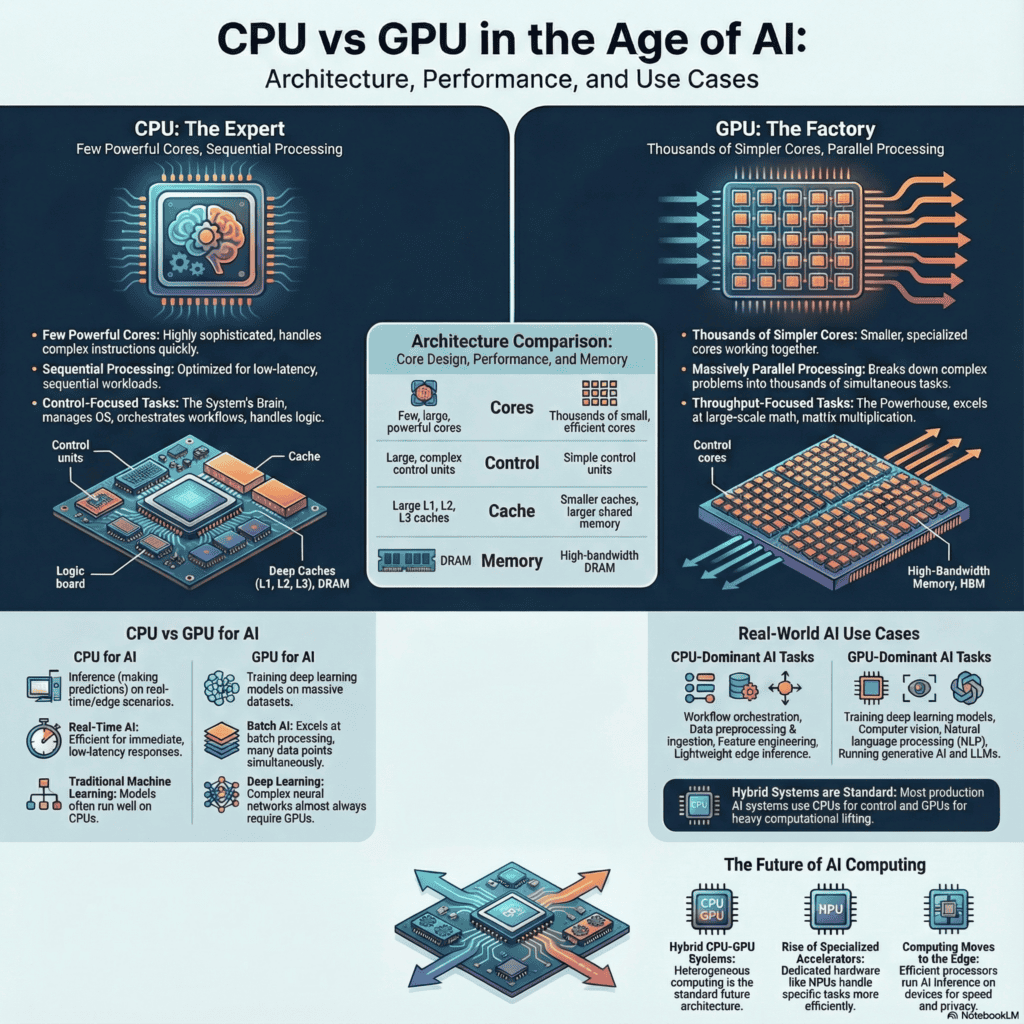
One analogy frames the CPU as a highly skilled expert who can solve many different, complex problems one at a time, very quickly. The GPU, in contrast, is like a factory with thousands of workers, each performing the same simple, repetitive task simultaneously.
Another useful analogy is that of a kitchen: the CPU is the head chef, managing all operations, making critical decisions, and ensuring everything runs smoothly. The GPU is like a junior assistant with ten hands, capable of flipping hundreds of burgers at once but needing direction from the chef.
These analogies highlight the fundamental trade-offs in their designs.
Core Complexity vs. Core Count
The most significant architectural difference is the balance between the number of cores and their complexity.
CPUs have a few powerful, complex cores (typically 4 to 64) designed to execute a single instruction thread as fast as possible. They prioritize instruction complexity and low latency.
GPUs have thousands of simpler, more efficient cores designed to execute many parallel threads at once. They prioritize parallel execution and high throughput.
Memory Access Patterns
Their memory systems are also designed for different purposes. This architectural trade-off is visually striking. A diagram of a CPU die shows massive blocks dedicated to Control units and multi-level Cache hierarchies (L1, L2, L3), with only a few large Cores. In contrast, a GPU die is a dense grid of hundreds or thousands of smaller green execution cores, with minimal silicon spent on control or deep caches. This visual difference is the physical manifestation of their design philosophies: low latency vs. high throughput.
CPUs rely on these deep cache hierarchies to keep frequently accessed data close to the cores. This design minimizes latency, which is crucial for speeding up sequential tasks.
GPUs use high-bandwidth memory (like GDDR6 or HBM) optimized for streaming large amounts of data to all of their thousands of cores simultaneously. The goal is to maximize throughput, ensuring the cores are never starved for data.
Execution Models
The way they execute instructions is fundamentally different, making them suitable for distinct types of problems.
CPUs are designed for sequential processing and excel at branching and conditional logic (e.g., if-then-else statements). This makes them ideal for running operating systems, applications, and managing system logic where decisions must be made based on prior outcomes.
GPUs are designed for parallel processing. They perform best when tasks are uniform and can be executed simultaneously across all cores. They struggle with branching and conditional logic, as it disrupts the parallel flow of work.
These architectural differences are why one processor is not inherently “better” than the other. They are purpose-built tools. GPUs vastly outperform CPUs in the highly parallelizable task of AI model training, while CPUs are essential for system-level control, orchestration, and logic-driven workloads.
5.0 CPU vs. GPU for AI Workloads (Training vs. Inference)
AI workloads are not monolithic; they generally fall into two distinct phases: training and inference. Understanding this distinction is critical for choosing the right hardware.
Training AI Models
Training is the process of teaching an AI model by feeding it massive datasets. During this phase, the model’s parameters (or “weights”) are adjusted repeatedly through a process that involves enormous amounts of computation. The key requirements for training are:
Heavy matrix math
High computational throughput
Massive parallelism
For this task, GPUs are vastly superior. Their ability to perform trillions of parallel calculations per second is exactly what is needed to process huge datasets and adjust the millions (or billions) of parameters in modern deep learning models in a reasonable amount of time.
AI Inference
Inference is the process of using a trained model to make predictions on new, unseen data. For example, when a language model answers a question or an image recognition model identifies an object in a photo, it is performing inference.
The hardware choice for inference is more nuanced:
High-volume inference, such as a cloud service processing thousands of user queries per second, may still require GPUs to handle the concurrent load efficiently.
Real-time or edge inference, where a single prediction is needed with very low latency (e.g., on a smartphone or in an autonomous vehicle), can often run efficiently on CPUs. At the edge, the overhead of sending data to a separate accelerator and the GPU’s higher idle power draw can make CPUs more efficient. A CPU can process a single, sporadic inference request with lower total energy and time-to-first-result, which is critical for battery-powered devices or real-time control systems.
Machine Learning vs. Deep Learning
The type of AI model also influences the hardware choice.
Traditional machine learning models (e.g., linear regression, decision trees) are often less computationally complex and frequently perform well on CPUs.
Deep learning models, which are based on multi-layered neural networks, almost always benefit from the massive parallelism of GPUs for both training and large-scale inference.
This is why modern AI systems rarely make an “either/or” choice. Instead, they strategically use both processors together in a hybrid approach to optimize the entire AI pipeline.
6.0 Performance, Power, and Cost Comparison
When evaluating CPUs and GPUs for AI, performance, power consumption, and cost are the three critical pillars of decision-making.
Latency vs. Throughput
These two metrics capture the core performance difference between CPU and GPU.
CPUs are designed to minimize latency: They focus on completing a single task as quickly as possible. This is ideal for general-purpose computing and logic-heavy operations.
GPUs are designed to maximize throughput: They focus on completing the maximum number of tasks in a given period. This is ideal for parallel workloads like AI model training, where thousands of calculations can be performed simultaneously.
Performance per Watt
For large-scale computing, power efficiency is a crucial factor.
For parallel workloads, GPUs deliver significantly higher performance per watt. Their specialized architecture allows them to perform more calculations using less energy compared to a CPU trying to handle the same task. This makes GPUs the ideal choice for large-scale data centers and AI training clusters where power and cooling costs are major operational expenses.
Cost Economics
The financial calculation for CPUs and GPUs is not as simple as comparing their upfront prices.
CPUs generally have a lower upfront cost and are more flexible for a wide variety of tasks.
GPUs are more expensive to purchase and operate but are dramatically faster for specific, parallelizable AI tasks.
A crucial insight, especially in cloud environments, is that a higher per-hour GPU cost can lead to a lower total job cost because tasks finish much faster. For instance, a CPU instance at $1/hour might take 12 hours to train a model (total cost: $12), while a GPU instance at $4/hour could complete the same job in one hour (total cost: $4). This 67% cost reduction is why per-hour pricing can be misleading in AI infrastructure planning.
7.0 Real-World AI Use Cases
In practice, modern AI systems are designed to leverage the unique strengths of both CPUs and GPUs. The choice of which processor dominates depends entirely on the specific task within the AI workflow.
CPU-Dominant Scenarios
CPUs excel at tasks that are sequential, logic-heavy, or require orchestration. They are the preferred choice for:
Data preprocessing pipelines: Cleaning, transforming, and preparing large datasets before they are fed into a model for training.
AI workflow orchestration: Managing the overall sequence of tasks, scheduling jobs, and moving data between different stages of the AI pipeline.
Lightweight inference: Running small, efficient models on the edge or for real-time, low-latency predictions where a single output is needed quickly.
Edge AI systems: In devices with power and thermal constraints, such as smartphones or IoT sensors, CPUs are often used for on-device inference.
GPU-Dominant Scenarios
GPUs are indispensable for workloads that can be broken down into thousands of simultaneous, repetitive calculations. They are critical for:
Deep learning training: The core task of training neural networks on massive datasets.
Computer vision: Processing high-resolution images and video streams for tasks like object recognition and segmentation.
Natural language processing (NLP): Training and running large language models for tasks like translation, sentiment analysis, and text generation.
Generative AI models: Powering the creation of new content, including text, images, and code.
Hybrid Systems
Most production-grade AI systems are hybrid systems. Consider a real-time video analytics platform:
A multi-core CPU handles the ingestion of thousands of video streams and uses lightweight logic to discard irrelevant frames.
For frames requiring analysis, the CPU preprocesses and batches them.
These batches are then passed to a GPU, which runs a complex computer vision model to detect objects.
The results are sent back to the CPU, which handles logging, alerting, and database updates. This seamless handoff is the essence of a modern hybrid AI system, where each processor handles the tasks it is best suited for to maximize both performance and cost-efficiency.
8.0 CPU and GPU Roles in Cloud & Enterprise AI
In modern cloud and enterprise environments, the division of labor between CPUs and GPUs has become a standardized architectural pattern for building scalable AI infrastructure. This model of cooperative, heterogeneous computing allows organizations to deploy and manage AI workloads efficiently and at scale.
The typical division of responsibilities is as follows:
CPUs manage the foundational infrastructure: This includes running the host operating systems, managing virtualization layers, and controlling container platforms like Docker and orchestration systems like Kubernetes. The CPU handles all the control plane tasks that keep the system running.
GPUs are provisioned as accelerator resources: GPUs are treated as specialized hardware resources that can be requested by a workload. They are dedicated to performing the heavy computation required for AI training and high-volume inference.
Scheduling systems allocate GPU time efficiently: Orchestration platforms like Kubernetes use schedulers to manage access to the pool of available GPUs. This ensures that these expensive resources are not left idle and are allocated to the jobs that need them most, maximizing utilization and return on investment.
This model has become the industry standard for scalable AI, providing the flexibility to run general-purpose tasks on CPUs while directing computationally intensive AI workloads to specialized GPU hardware.
9.0 Limitations of CPUs and GPUs
While both processors are powerful, no single processor can handle every task optimally. Understanding their respective limitations is key to designing an effective AI system.
CPU Limitations
For modern, large-scale AI workloads, CPUs have several significant weaknesses:
Inefficient for large-scale matrix math: Their sequential architecture is a poor match for the parallel nature of deep learning computations, leading to performance bottlenecks.
Results in slower model training times: A training job that might take days on a GPU could take months or even years on a CPU, making it impractical for serious AI development.
Poor scalability for deep learning workloads: As models and datasets grow, the performance gap between CPUs and GPUs widens dramatically. Adding more CPU cores provides diminishing returns for these types of tasks.
GPU Limitations
Despite their power, GPUs are not a universal solution and have their own set of constraints:
High upfront and operational cost: GPUs are significantly more expensive than CPUs and consume more power, leading to higher operational expenses.
Limited on-chip and on-card memory capacity: While GPU memory is very fast, it is often much smaller than the system RAM available to a CPU. This can be a bottleneck for extremely large models or datasets.
Less efficient for sequential, logic-heavy, or control-flow-dependent workloads: GPUs struggle with tasks that require frequent branching or complex decision-making, as these operations disrupt their parallel execution model.
10.0 The Future Beyond CPU vs. GPU: Heterogeneous Computing
The future of AI computing is not about choosing one processor over another. The “CPU vs. GPU” debate is giving way to a more sophisticated and powerful paradigm: heterogeneous computing. This is a cooperative model where a diverse set of specialized processors work together, each handling the tasks for which its architecture is best suited.
This integrated and cooperative model will define the architecture of AI infrastructure for the next decade, with roles distributed as follows:
CPUs will continue to serve as the system’s “brain,” responsible for general control, workflow orchestration, running operating systems, and executing sequential, logic-heavy code.
GPUs will remain the workhorses for massive parallel computation, dominating the fields of deep learning training and high-performance computing.
Specialized accelerators (e.g., NPUs), or Neural Processing Units, are emerging to handle specific AI workloads with maximum efficiency. NPUs are designed for the “high-performance inferencing tasks required by AI” and are ideal for “preparing pre-trained neural networks for the inferencing stage,” offering even better performance-per-watt than GPUs for these designated tasks.
Edge processors are being developed for efficient, low-power inference directly on devices like smartphones, cameras, and IoT sensors, enabling real-time AI capabilities without relying on the cloud.
This move toward specialized, cooperative hardware will allow for more powerful, efficient, and scalable AI systems, from massive cloud data centers to tiny on-device processors.
11.0 Decision Guide: CPU, GPU, or Hybrid?
For engineers, architects, and decision-makers, choosing the right computing strategy depends on the specific workload, performance goals, and budget constraints. This practical guide can help you make the right choice.
Choose CPU only if:
Your workloads are primarily logic-heavy and sequential, with little to no need for massive parallelism.
The AI models you use are small and not computationally intensive (e.g., traditional machine learning models).
Low latency for single, individual tasks is more critical than high throughput for many concurrent tasks.
Choose GPU if:
Your primary workload is training deep learning models, especially those involving computer vision or natural language processing.
You are processing massive datasets with parallel operations like matrix multiplication or tensor computations.
You are running or developing generative AI workloads, including large language models.
Choose CPU + GPU (Hybrid) if:
You are building production-grade, end-to-end AI systems that involve data preprocessing, model training, and deployment.
You need to scale workloads efficiently in cloud or enterprise environments where resource optimization is key.
You want to optimize for both total cost and performance across a varied AI pipeline, using the best tool for each job.
12.0 Frequently Asked Questions (FAQs):
What is the main difference between a CPU and a GPU?
A CPU is designed for sequential processing and system control, while a GPU is designed for massively parallel processing and high-throughput computation.
Is a GPU better than a CPU for AI?
GPUs are better for deep learning and large-scale AI workloads because they process parallel mathematical operations efficiently, while CPUs remain essential for orchestration and inference.
Do I need a GPU for machine learning?
Not always. Traditional machine learning models can run effectively on CPUs, but GPUs are recommended for deep learning models and large datasets.
Why are GPUs used for deep learning?
Deep learning relies on matrix and tensor operations that can be executed in parallel, which makes GPUs significantly faster than CPUs for training models.
What is the difference between AI training and inference?
Training teaches an AI model using large datasets and requires high computation, while inference uses the trained model to make predictions and can often run efficiently on CPUs.
Can CPUs handle AI workloads without GPUs?
Yes. CPUs can handle smaller AI models, inference tasks, and edge AI workloads, but training large deep learning models on CPUs is slow and inefficient.
Why do AI systems use both CPUs and GPUs?
Modern AI systems use CPUs for control, data handling, and orchestration, while GPUs handle heavy numerical computation, making hybrid systems the most efficient.
How do I choose between CPU and GPU for my project?
Use CPUs for logic-heavy or low-latency tasks, GPUs for deep learning and large-scale computation, and a hybrid setup for most real-world AI applications.
Will CPUs become obsolete because of AI?
No. CPUs remain critical for AI systems by managing coordination, system logic, and many inference workloads.
13. Quiz (Knowledge Check)
CPU vs GPU for AI: Test Your Knowledge
Test your knowledge of CPU vs GPU for AI, including architecture differences, AI training vs inference, and real-world use cases.
A CPU handles sequential processing, control logic, and overall system orchestration.
What is the primary function of a GPU?
A GPU performs massively parallel computations, making it ideal for AI and deep learning workloads.
How does CPU processing differ from GPU processing?
CPUs focus on sequential, logic-heavy tasks, while GPUs focus on parallel, high-throughput computation.
Why are GPUs used for deep learning?
Deep learning relies on matrix and tensor operations that benefit from massive parallelism.
What is AI training?
AI training involves teaching a model using large datasets and repeated computations.
What is AI inference?
AI inference uses a trained model to make predictions, often running efficiently on CPUs.
Why do AI systems use both CPUs and GPUs?
CPUs manage logic and orchestration, while GPUs handle intensive parallel computation.
Are CPUs becoming obsolete due to AI?
No. CPUs remain essential for control, coordination, and many inference tasks.
15 Conclusion: The Right Way to Think About CPU vs. GPU
The “CPU vs. GPU” debate, when framed as a competition, is outdated in the age of AI. The real question is not which processor is better, but how they work together synergistically to power modern computational workloads. Each is a specialized tool with a distinct architectural philosophy, and understanding their complementary relationship is the key to building effective AI systems.
To summarize their roles: CPUs provide the intelligence, coordination, and flexibility required to manage complex systems, while GPUs provide the raw computational power at scale needed for deep learning. When combined, they form the indispensable foundation of every modern AI application.
Mastering this synergistic relationship is no longer an academic exercise; it is the cornerstone of effective AI system design. For the architects building scalable cloud infrastructure, the engineers deploying models at the edge, and the leaders making critical budget decisions, understanding precisely how to orchestrate CPUs and GPUs is the definitive skill for unlocking computational efficiency and driving innovation in the decade ahead.
Prices and features mentioned are accurate as of the date of publication. Always check the official provider website for the most current pricing and availability.
Prices and features mentioned are accurate as of the date of publication. Always check the official provider website for the most current pricing and availability.