Physical Address
304 North Cardinal St.
Dorchester Center, MA 02124
Physical Address
304 North Cardinal St.
Dorchester Center, MA 02124

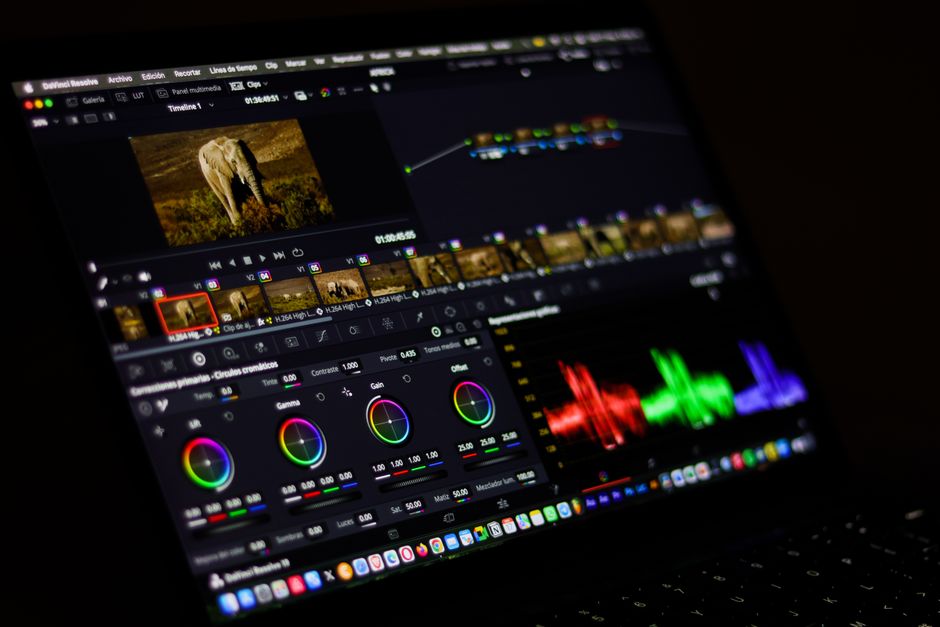
Final Cut Pro 11 vs DaVinci Resolve 21. Read our complete 2026 comparison of specs, pricing, and AI features to choose the best Mac video editor.
The Apple Mac platform has long been the premier choice for creative professionals, offering unmatched hardware-software synergy. In 2026, the landscape of professional video editing on macOS has reached its highest peak yet, dominated by two industry giants: Apple’s own Final Cut Pro 11 and Blackmagic Design’s groundbreaking DaVinci Resolve 21. For years, editors chose their tools based on simple user interface preferences or basic color-grading needs. However, the integration of powerful local artificial intelligence (AI) and the rise of immersive spatial content have completely redefined what editors expect from their software in 2026.
With Apple releasing Final Cut Pro 11—introducing deep AI integration and native spatial video editing—and Blackmagic Design shipping the massive DaVinci Resolve 21 update in mid-2026, featuring a dedicated Photo page and IntelliSearch, selecting the perfect software has never been more challenging. Both programs are heavily optimized to run natively on Apple Silicon, harnessing the massive power of the M-series chips to render and process complex timelines at lightning speed. Whether you are a solo YouTuber, a freelance colorist, or a Hollywood-level post-production studio, this head-to-head comparison breaks down their features, performance, pricing, and workflows to help you make an informed decision for your production pipeline in 2026.
To give you an immediate snapshot of how these two powerhouse video editors stack up, we have compiled an at-a-glance comparison of their core features, pricing, and target audiences. Both of these editors offer exceptional value by rejecting the monthly subscription models that plague other creative suites.
| Feature / Specification | Final Cut Pro 11 | DaVinci Resolve 21 (Free / Studio) |
|---|---|---|
| Pricing Model | $299.99 (One-time purchase, 90-day free trial) | Free Tier / $295 (Studio, one-time purchase) |
| Timeline Architecture | Magnetic Timeline (Trackless, fluid sync, auto-gaps) | Traditional Track-Based Timeline (Multi-track, precise control) |
| Key AI Features | Magnetic Mask, Transcribe to Captions, Smart Conform | IntelliSearch, AI UltraSharpen, AI Motion Deblur, Speech Generator |
| Spatial / VR Video Support | Native Spatial Video Editing (directly for Apple Vision Pro) | Apple Immersive foveated rendering, VR180, and VR360 |
| Audio Integration | Basic built-in tools (Voice Isolation, voice-over recording) | Fairlight (Professional audio suite with track folders and clip EQ) |
| Visual Effects (VFX) | Requires Motion companion app or third-party plugins | Fusion (Node-based VFX suite natively integrated, Krokodove templates) |
| New 2026 Specialty Feature | Deep iOS/iPadOS companion integration & Final Cut Camera sync | The brand-new Photo Page (Tethered photography & RAW management) |
| Hardware Optimization | Perfect Apple Silicon M-series optimization (Metal & Neural Engine) | Excellent Apple Silicon support and local offline AI acceleration |
To understand which software deserves a spot in your Dock, we must look beyond marketing buzzwords. Both Apple and Blackmagic Design have poured years of engineering into these releases, introducing cutting-edge workflows that redefine modern digital video production. Here is an in-depth look at what each application brings to the table in 2026.
Apple’s Final Cut Pro 11 is a milestone release. For over a decade, Apple satisfied users with incremental updates to version 10. The jump to Final Cut Pro 11 signals a major shift toward AI-centric, hardware-integrated editing workflows designed specifically for the Apple ecosystem. It is built to leverage the raw performance of Apple’s Neural Engine inside M-series processors, making it incredibly fast and efficient.
The centerpiece of Final Cut Pro 11 is the revolutionary Magnetic Mask. This AI-driven tool allows editors to isolate any person, object, or background in a video clip instantly. Unlike traditional rotoscoping or chroma-keying which require green screens and meticulous frame-by-frame masking, Magnetic Mask automatically tracks moving subjects with surgical accuracy. This allows you to apply precise color corrections, stylized lighting adjustments, or motion graphics behind a subject in seconds, drastically cutting down post-production times.
Another major addition is the Transcribe to Captions tool. Utilizing a highly advanced, Apple-trained language model that runs entirely locally, Final Cut Pro 11 can transcribe spoken dialogue in real-time and generate accurate closed captions on the editing timeline. It is incredibly efficient, handling diverse accents and quiet audio with ease, and is entirely offline, protecting your production privacy.
Perhaps the most forward-looking feature is native Spatial Video Editing. With Apple heavily backing its spatial computing platform, Final Cut Pro 11 allows editors to import, color-grade, effect, and deliver 3D spatial videos captured on iPhone 15 Pro, the iPhone 16 lineup, and compatible camera configurations like the Canon R7 paired with stereoscopic lenses. Users can preview these immersive angles on their Mac and export them seamlessly to the Apple Vision Pro. Combined with a flat one-time pricing of $299.99, Final Cut Pro 11 offers an incredibly streamlined experience for the modern creator.
Blackmagic Design’s DaVinci Resolve 21, shipped in the summer of 2026, is a triumph in software engineering. What began as a high-end color-grading tool has matured into the most complete creative suite on the market. Resolve 21 breaks down the final barriers between photography and videography, making it an indispensable asset for multimedia studios.
The headline feature of DaVinci Resolve 21 is the brand-new Photo Page. This dedicated workspace allows photographers to import, rate, organize, and manage raw still image catalogs. Even better, it fully integrates with Resolve’s legendary, node-based Color Page. This means you can now use Hollywood-grade color grading tools—such as qualifiers, power windows, and custom curves—directly on RAW photographs. For creators who shoot both cinematic video and high-end commercial stills, this unified workflow is a total game-changer, eliminating the need to pay for external photo editing subscriptions.
Under the hood, the DaVinci Neural Engine in version 21 introduces several brilliant AI-driven features. The standout tool is IntelliSearch, which indexes all imported media using semantic AI. Editors can type natural-language search queries like ‘red sports car driving fast’ or ‘sunset over mountains,’ and Resolve will instantly filter and display the exact clips matching that description. Additionally, AI UltraSharpen and AI Motion Deblur allow editors to salvage out-of-focus shots and remove blurry artifacts, while the new AI Speech Generator and IntelliScript simplify dialogue-heavy workflows.
Blackmagic continues to set the standard for privacy. Unlike competitors that force users to upload footage to the cloud for AI processing, all DaVinci Resolve 21 AI calculations occur locally on your Mac’s hardware. The software remains incredibly accessible: the standard edition is completely free and supports 4K UHD editing at 60fps. For professional studios, the upgraded DaVinci Resolve Studio 21 is a one-time purchase of $295, unlocking advanced multi-GPU acceleration, stereoscopic tools, foveated rendering for Apple Immersive media, and professional temporal noise reduction.
In 2026, selecting between Final Cut Pro 11 and DaVinci Resolve 21 is not about which program is objectively ‘better.’ Instead, it is about identifying which editor matches your workflow, creative goals, and technical demands. Use this buying guide to determine where to invest your time and money.
You prioritize speed above all else: The Magnetic Timeline is the fastest way to edit video. It eliminates gaps, keeps audio and video synced automatically, and is perfect for quick-turnaround content. If you are a solo YouTuber, TikTok creator, or digital marketer, Final Cut Pro 11 will save you hours of structural timeline management.
You are heavily invested in the Apple ecosystem: If you shoot on an iPhone, edit on an M-series Mac, record using the Final Cut Camera app, and occasionally edit on the go with Final Cut Pro for iPad, the ecosystem integration is flawless. Projects sync effortlessly, and native Spatial Video editing for the Apple Vision Pro is as seamless as it gets.
You prefer an intuitive, clean interface: Final Cut Pro 11 hides complex settings behind an elegant, distraction-free UI. This allows beginners to start editing immediately without feeling overwhelmed, while still providing professional-grade tools under the hood.
You require elite color grading and audio mixing: Resolve’s node-based color grading is the industry standard for a reason. Combined with the Fairlight audio suite, which now supports track folders and a 6-band clip EQ, you have a complete post-production facility in a single program. You will rarely need to jump to external audio or VFX software.
You shoot both photography and videography: With the introduction of the Photo Page in 2026, Resolve 21 is a dream come true for hybrid creators. Being able to organize photos, tether cameras, and use cinematic color nodes on RAW images in one application is an incredibly powerful workflow that saves you both time and software subscription fees.
You want maximum value for a $0 budget: The free version of DaVinci Resolve 21 is shockingly robust. It provides access to nearly all editing, color, and audio features up to 4K resolution, making it the best starting point for cash-strapped filmmakers and students.
Yes. Blackmagic Design offers a remarkably powerful free tier of DaVinci Resolve 21. It includes the Edit, Cut, Color, Fusion, Fairlight, Photo, and Deliver pages, allowing you to edit and export up to UHD 4K resolution at 60fps. The paid DaVinci Resolve Studio 21 version ($295) is only required if you need specific advanced features, such as advanced AI tools, 10-bit color pipelines, resolutions higher than 4K, or professional noise reduction.
Yes, DaVinci Resolve 21 supports advanced spatial and immersive workflows, including Apple Immersive foveated rendering, VR180, and VR360 formats. However, Final Cut Pro 11 provides a much simpler, out-of-the-box spatial video editing pipeline specifically optimized for content captured on Apple devices like the iPhone 15 Pro and iPhone 16 series, making it the preferred choice for native Apple Vision Pro content creators.
No. Both Apple and Blackmagic Design have rejected the subscription-only software model in 2026. Final Cut Pro 11 is available for a one-time purchase of $299.99, while DaVinci Resolve Studio 21 is available for a one-time purchase of $295. Both licenses grant you lifetime updates with no hidden fees or monthly charges.
Both applications are deeply optimized for Apple Silicon (including the M1, M2, M3, and M4 generations). Final Cut Pro 11 tends to feel slightly snappier during basic timeline scrubbing and multicam playback because it is designed exclusively for macOS. However, DaVinci Resolve 21 is highly optimized for local AI workloads, utilising the Apple Neural Engine directly to ensure hardware-accelerated tracking, sharpening, and color grading that matches Final Cut’s efficiency.
The year 2026 has brought us two of the most impressive video editing updates in history, but they serve different creative philosophies. For solo creators, vloggers, and anyone heavily integrated into the Apple hardware ecosystem, Final Cut Pro 11 is the ultimate choice. Its Magnetic Timeline, swift native performance, and effortless AI tools like Magnetic Mask and Transcribe to Captions make it the fastest, most streamlined tool for modern digital media production.
However, for professional editors, filmmakers, and hybrid creators, DaVinci Resolve 21 is the undisputed champion. By integrating the revolutionary Photo Page with its elite node-based color grading, comprehensive Fairlight audio mixing, and Fusion visual effects, Blackmagic Design has created a complete, all-in-one media production studio. When you factor in the robust free version and the highly competitive $295 one-time Studio price, DaVinci Resolve 21 reigns supreme as the best overall Mac video editor in 2026.
Prices and features mentioned are accurate as of the date of publication. Always check the official provider website for the most current pricing and availability.




